
ShixxNOTE6 - Download
You'll be able to download in few seconds.
Publisher Description
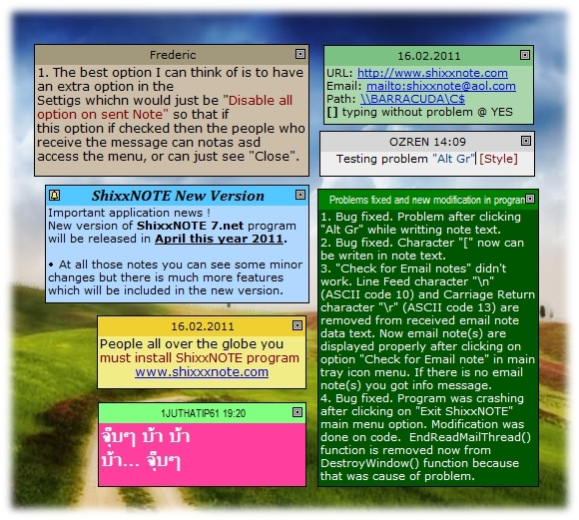
Desktop sticky notes (post-it) program, that allows you to keep desktop sticky notes and also send them across the network to others. ShixxNote is a network enabled sticky (post-it) notes program. The program runs in client/server mode and transmits messages or notes to selected ShixxNote clients on the network. You can also send messages to machines that do not have ShixxNote installed, in which case the program will automatically use the standard Windows Messenger service to deliver the message. In ShixxNote creating a note is a matter of making a double click on the program icon in the system tray. Once created, a note is displayed on your desktop and can be instantly shared over LAN, the Internet or email with all the interested parties. You can share notes with specific recipients or groups of users, save, print, export and import notes, set alarms and expiration dates, save notes to files and fully customize their appearance to match your desktop theme. It is multi thread client/server network tool that lets you display notes on your desktop and send them through your local network (LAN), Internet or via email to others. Easy to use personal info management application and powerful communication tool. It makes writing notes to your self or to your colleagues very easy and instant. The sticky notes appear 'stuck' on your desktop, and it is pretty hard to forget something that is written on them. It is configurable and stable. All computer users which work in a small or middle office. Where they have all computer integrated in a Local Area Network. This user can be working in some dentist office, or can be some student on University.
About ShixxNOTE
This PIMS & Calendars program is available in English. It was last updated on 29 September, 2026. ShixxNOTE is compatible with the following operating systems: Windows.
The company that develops ShixxNOTE is Mavel. The latest version released by its developer is 6.
The download we have available for ShixxNOTE has a file size of N/A. Just click the green Download button above to start the downloading process. The program is listed on our website since 2012-09-20 and was downloaded 0 times. We have already checked if the download link is safe, however for your own protection we recommend that you scan the downloaded software with your antivirus. Your antivirus may detect the ShixxNOTE as malware if the download link is broken.
How to install ShixxNOTE on your Windows device:
- Click on the Download button on our website. This will start the download from the website of the developer.
- Once the ShixxNOTE is downloaded click on it to start the setup process (assuming you are on a desktop computer).
- When the installation is finished you should be able to see and run the program.
Program Details
System requirements
Download information
Pricing
Version History
version 6.net
posted on 2012-09-20
Trancpareny effect is added if you have Windows XP or higer version. When you delete or hide note you will see how note disappears smoothly.
version 6.net
posted on 2012-09-20
Working on Windows 10 and few minor bug has been fixed.
version 6.net
posted on 2006-12-21
Critical security bug fixed (buffer-overflow) and important bux fixed (all received notes will be visible after computer or program restart), etc.
Disclaimer
External Download
We do not host ShixxNOTE on our servers. We did not scan it for viruses, adware, spyware or other type of malware. This app is hosted by the software publisher and passed their terms and conditions to be listed there. We recommend caution when installing it.
The external download link for ShixxNOTE is provided to you by apps112.com without any warranties, representations or guarantees of any kind, so access it at your own risk.
If you have questions regarding this particular app contact the publisher directly. For questions about the functionalities of apps112.com contact us.
